
World Edit’s shape //generation how-to [Math formula list & tips]
[UPDATED] Shapes and colors: a guide. I’m trying to understand generation. Here are my notes!
3D parametric geometry
World Edit’s //g (//gen or //generate) command creates blocks using complex math equations within your selection. It’s powerful but not accessible – with the right shape, you could integrate it into your build to create donuts, trees, plants, terrain, ship hulls or decorations. I played around to try find useful examples!
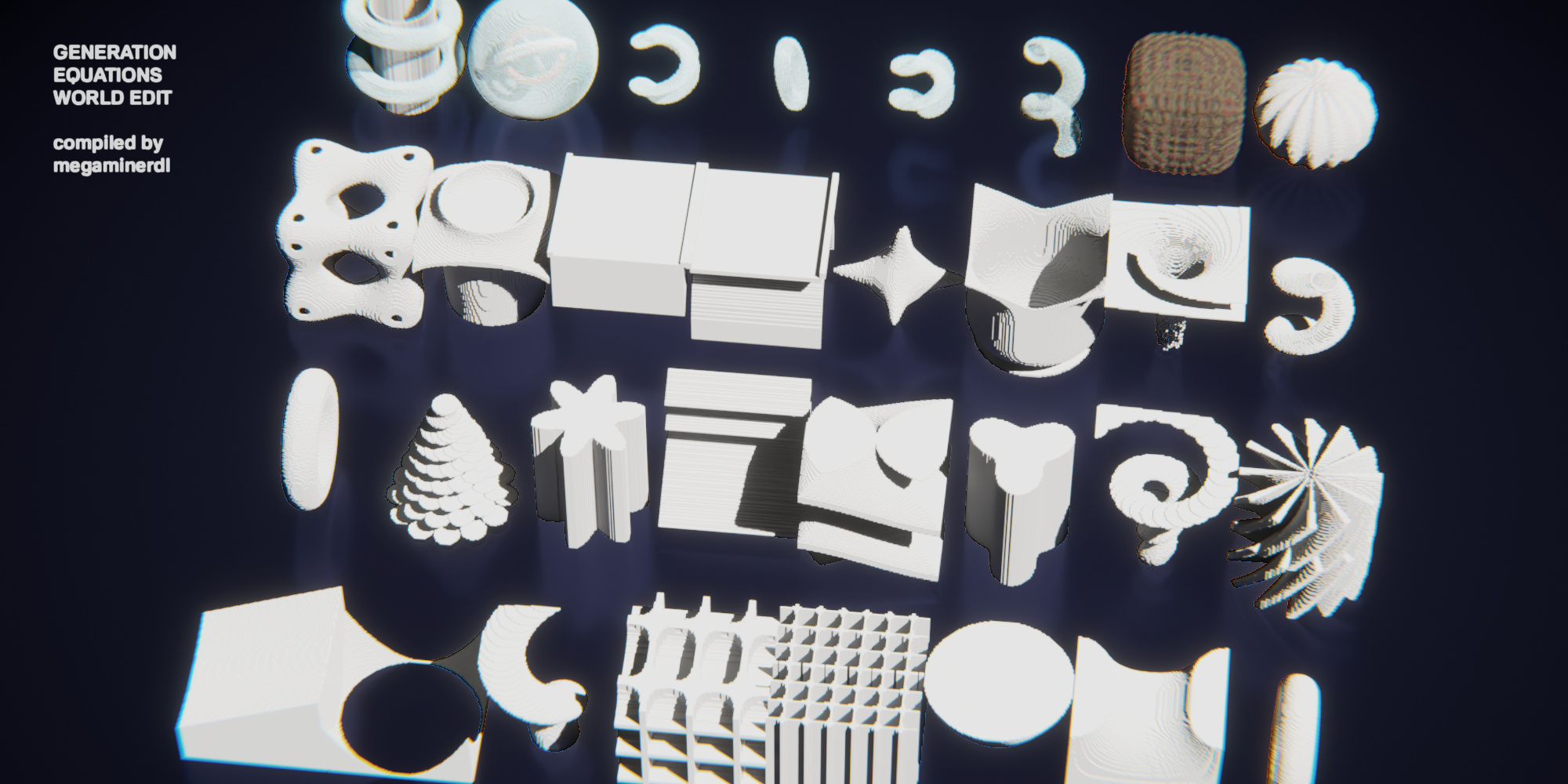
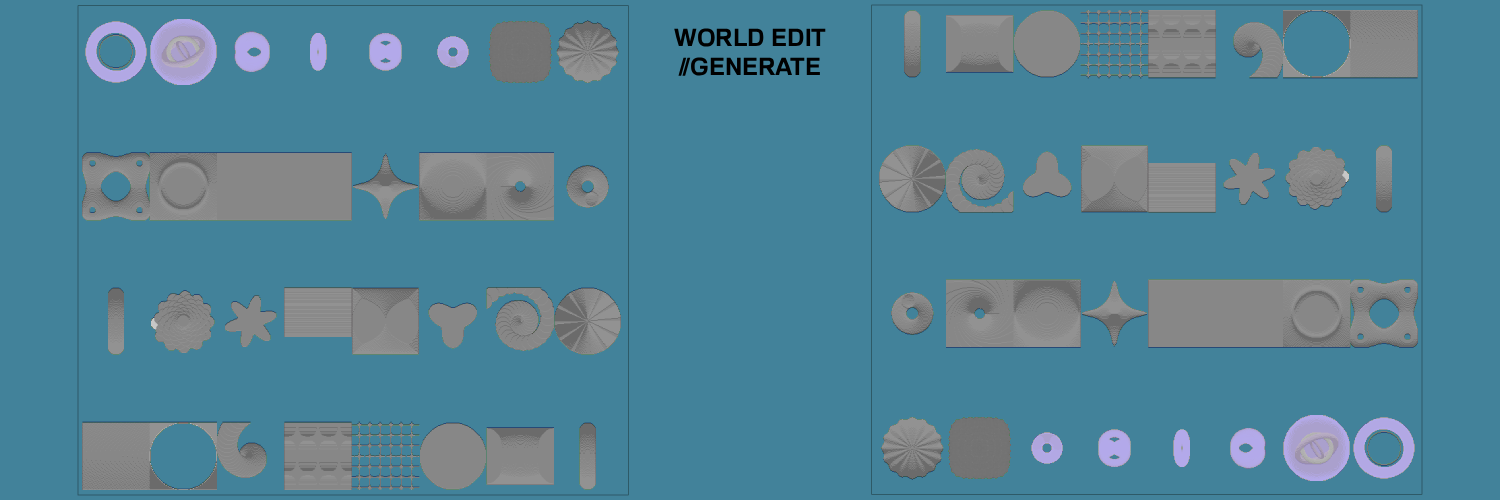
Every shape can be combined or further modified with masking, stacking, rotation, or other plugins. I generated all my shapes on the cover at 100x100x100 size each. (SELECTION SIZE MATTERS!)
I searched the web for examples and asked ChatGPT to explain and give more. Take a look, copy these examples or prompt your own AI! (The prompt I gave was “In Minecraft World Edit I can generate a shape using <example //g command>. How does it work? Can you generate equations if I describe a shape?)
The hollow command accepts extra tags: -r (raw coordinates), -c (center), -o (origin shift) or -h (hollow).
ALSO: You should be able to use //calc command with all its supported variables to help verify or calculate expressions. Though I’m still not sure how that one works, maybe you do?
World Edit Wiki basic examples
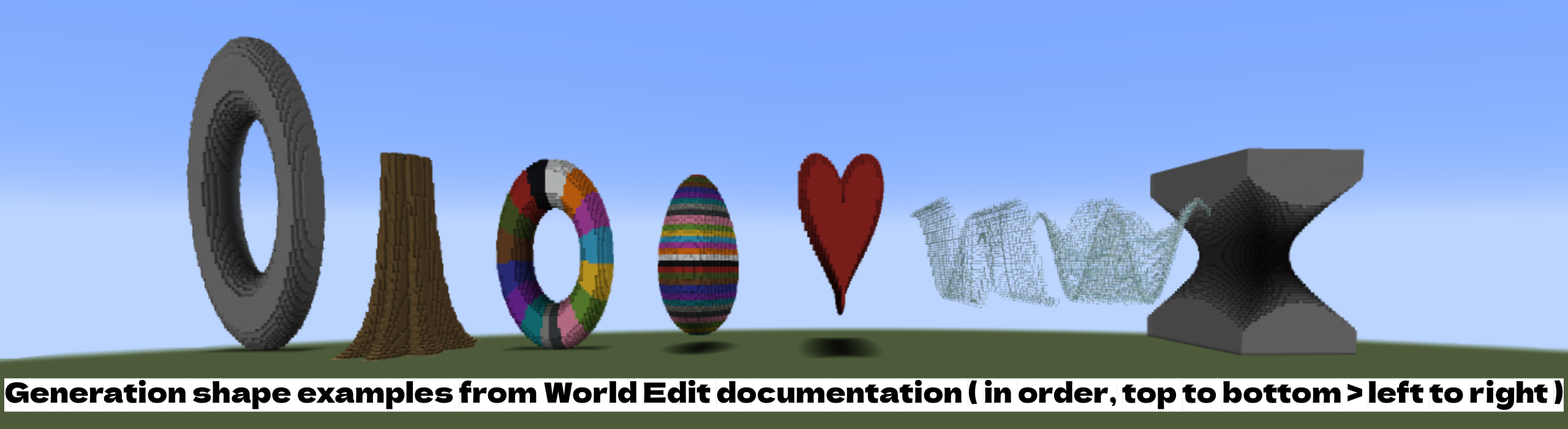
Torus of major radius 0.75 and minor radius 0.25: //g stone (0.75-sqrt(x^2+y^2))^2+z^2 < 0.25^2

Gnarled hollow tree: //g -h oak_log (0.5+sin(atan2(x,z)*8)*0.2)*(sqrt(x*x+z*z)/0.5)^(-2)-1.2 < y

Rainbow Torus: //g white_wool data=(32+15/2/pi*atan2(x,y))%16; (0.75-sqrt(x^2+y^2))^2+z^2 < 0.25^2

Rainbow Egg: //g white_wool data=(32+y*16+1)%16; y^2/9+x^2/6*(1/(1-0.4*y))+z^2/6*(1/(1-0.4*y))<0.08

A heart: //g red_wool (z/2)^2+x^2+(5*y/4-sqrt(abs(x)))^2<0.6

Sine wave: //g -h glass sin(x*5)/2<y

Radial cosine wave: //g -h glass cos(sqrt(x^2+z^2)*5)/2<y

Circular hyperboloid: //g stone -(z^2/12)+(y^2/4)-(x^2/12)>-0.03
Various shapes through AI prompting
PICTURED IN COVER IMAGE (towards the front)
Tapering spiral staircase: //g stone turns=4;phase=pi/44;A0=0.40;A1=0.0;r=0.18;t=y;th=2*pi*turns*t+phase;A=A0+(A1-A0)*t;x+=sin(th)*A;z+=cos(th)*A;return x*x+z*z<r*r

turns=4;                → 4 full turns (revolutions) of the spiral
phase=pi/44;            → phase shift (rotation offset)
A0=0.40; A1=0.0;        → spiral radius from start to end (tapering spiral)
r=0.18;                 → radius of the "tube" (thickness of the spiral)
t=y;                    → parametric variable t tied to the y-coordinate (height)
th=2*pi*turns*t+phase;  → theta (angle) as a function of t
A=A0+(A1-A0)*t;         → interpolate radius from A0 to A1 based on t
x+=sin(th)*A;           → X coordinate from sine (spiral around center)
z+=cos(th)*A;           → Z coordinate from cosine
return x*x+z*z<r*r;     → defines the shape's thickness (a tube)
Flower shape: //g stone x^2 + z^2 < (0.6 + 0.2*sin(6*atan2(x,z)))^2
Sin number = number of petals e.g. sin(3Large stair triangles: //g stone y > ((x+0.25)%0.5 - 0.25)*2
Rotate by changing xyz: //g stone x > ((y+0.25)%0.5 + 0.25)*2Square double helix: //g stone (abs(cos(atan2(x,z) + y*1*pi)) * 1) > max(abs(x),abs(z))
More turns = e.g. y*4*piTree-like spiral ramp: //g stone turns=2;a=0.2; b=0.15;t=y; th=2*pi*turns*t;r=a*exp(b*th);x+=sin(th)*r;z+=cos(th)*r;return x*x+z*z<0.05;
turns → more spiral loops
b → tighter or looser shell
0.05 → thickness of the shell wallCorkscrew drill: //g stone abs((atan2(x,z) + y*8*pi) % (pi/6)) < 0.1 && sqrt(x^2+z^2) < 1
8*pi → change number of turns (e.g., 4*pi = 2 turns)
pi/6 → spacing between steps
0.1 → step thickness
1 → radius of the staircaseH shaped ridge: //g stone abs(x) < 1 && x^4 + (y * (1 - z^2))^2 < 0.5Filled bowl-like shape: //g stone x^2 + z^2 < yBackrooms repeating grid Version 1: //g stone fractal = sin(10*x)*cos(10*z); return abs(fractal) < 0.1
Backrooms repeating grid Version 2: //g stone abs(sin(5*y) * cos(3*x)) < 0.2
Change number*xyz to change grid size or directionTree-like golden spiral: //g stone a=0.3; phi=1.618; t=y; theta=2*pi*t; r=a*phi^(theta); x+=cos(theta)*r; z+=sin(theta)*r; return x*x+z*z<0.1Four corner spike: //g stone x^2 + z^2 < y + 3 && x^2 + z^2 > y + 2Terrain canyon slope: //g stone y < 3 * sin(x / 5)^2 + 3 * sin(z / 7)^1
Play with the ^2 and ^1Shapes and rotations from AntOfThy
PICTURED IN COVER IMAGE (towards the back)
Sphere: //g -h glass x^2+z^2+y^2 < 1
Cylinder: //g -c -h stone x^2+z^2<25^2

Horizontal torus: //g -c -h glass (37-sqrt(x^2+z^2))^2+y^2<8^2
Angled torus: //g -c -h glass rotate(x,z,-.5); rotate(x,y,.25); data=(y>-4?15:0); (37-sqrt(x^2+z^2))^2+y^2<8^2

Nested rotated rings:
//g -c -h diorite rotate(x,z,.4); rotate(x,y,1); (30-sqrt(x^2+z^2))^2+y^2<4^2
//g -c -h granite rotate(x,z,-.2); rotate(x,y,-.4); (22-sqrt(x^2+z^2))^2+y^2<3^2
//g -c -h andesite rotate(x,z,-1); rotate(x,y,1.3); (16-sqrt(x^2+z^2))^2+y^2<2^2
Advanced shapes from WesterosCraft
PICTURED IN COVER IMAGE (towards the middle-back)
Hollow 4D Cube: //g stone ((x^4+y^4+z^4-x*x-y*y-z*z)^2-0.2)^2 < 0.001

Tower Hanging Roof: //g stone ((x*x+y*y*y*5+z*z-2.3)*(x*x+z*z-0.5))^2 < 0.02

Bridge Arch: //g stone (y> -(x^2)+0.85)*(z*z<0.95)*(y<0.95)+(z*z>0.85)*(y>0.9)

Fancy Bridge: //g stone (((x^4-0.6+y)^2<0.05*x^2)+((x^2/5-y+0.75)^2<0.02))*(z*z*9<8)*(y*9<8)+(z*z*7>6)*(y*9>8)

Spike star sparkle: //g stone ((x^2+y^2+(z/9)^2-0.01)*((x/9)^2+y^2+z^2-0.01)*(x^2+(y/9)^2+z^2-0.01))^2 <9^-6

Vase: //g stone (((x*x-y^5+z*z-1))^2<0.005)+((x^2+z^2+(y+0.99)^2*1500-0.4)^2 <0.3)

Tornado: //g stone (((atan2(x,z)+(y-1)*20+1/(x*x+z*z))*(atan2(x,z)+6.2832+(y-1)*20+1/(x*x+z*z)))^2<2)

Hollow Spiral: //g stone (((x-0.4*sin(y*5))^2+(z-0.4*cos(y*5))^2-0.04))^2 <0.00007

Pumpkin: //g stone (((x^2+1.5*y^2+z^2-(0.7+0.05*cos(16*atan2(x,z)))))^2 <0.01)
Mega-fancy-cube: //g white_stained_glass data=((y*y+x*x+z*z+0.2)*32%4+12); ((x^4+y^4+z^4-0.6+cos(32*atan2(x,z))/32+cos(32*atan2(y,z))/32+cos(32*atan2(x,y))/32))^2 <0.002
Longer Commands: (These only work with a plugin that allows longer chat input?)
Double Helix: //g white_wool data=((y+1)*8)*(x*x+z*z<0.2)+(x*x+z*z>0.2)*15; ((((x-(sin(y*5)/1.5))^2+(z-(cos(y*5)/1.5))^2)<0.04))
+((((x+(sin((y)*5)/1.5))^2+(z+(cos((y)*5)/1.5))^2)<0.04))
+(((y+1)%0.125<0.025)
*(((((sin(y*5)*sqrt(x^2+z^2)-x)^2)+((cos(y*5)*sqrt(x^2+z^2)-z)^2))<0.005)
+((((sin(y*5)*sqrt(x^2+z^2)+x)^2)+((cos(y*5)*sqrt(x^2+z^2)+z)^2))<0.005)))
*((x^2 + z^2) < 0.5 )Cylinder & Offset Cylinder:
//g -c -h glass x^2+z^2<8^2
//g -c -h glass x-=15; x^2+z^2<8^2
Oval & Offset Oval Cylinder:
//g -c -h glass x-=15; x^2+z^2<8^2
//g -c -h glass z/=1.5; x-=15; x^2+z^2<8^2
Twisting vine spirals: (Stacking the Double Helix fits in 46x60x46?)
//g -c -h glass rotate(x,z,pi*y/30); z/=1.5; x-=15; x^2+z^2<8^2
//g -c -h glass rotate(x,z,pi*y/30); z/=1.5; x+=15; x^2+z^2<8^2
Vertical & Angled Torus:
//g -c glass (22-sqrt(x^2+y^2))^2+z^2<6^2
//g -c 95:15 rotate(y,z,.3); (22-sqrt(x^2+y^2))^2+z^2<6^2
Twisted Mobius Shape:
//g -c glass rotate(x,z,pi*y/30); (22-sqrt(x^2+y^2))^2+z^2<6^2
//g -c 95:15 rotate(x,z,pi*y/30); z-=10; (22-sqrt(x^2+y^2))^2+z^2<6^2Generating multi-colored shapes
I honestly don’t know, but AI helped explain in detail the multi-colored “Mega-fancy-cube” from above:
//g white_stained_glass data=((y*y+x*x+z*z+0.2)*32%4+12); ((x^4+y^4+z^4-0.6+cos(32*atan2(x,z))/32+cos(32*atan2(y,z))/32+cos(32*atan2(x,y))/32))^2 <0.002The command defines a fancy, distorted cube-like shape using high-powered terms (x^4, etc.) and angular ripples. It generates stained glass blocks within that shape, colored based on distance from the center, using a modular pattern that cycles thru brown, green, red, black.
The command has two parts separated by the ;
Part 1: white_stained_glass data=((y*y+x*x+z*z+0.2)*32%4+12);This sets the main block followed by its data value: In Minecraft Java, stained glass uses block states, but in older versions or with WorldEdit, data values (0–15) are used to determine color. In this example:
(y*y + x*x + z*z) → Squared distance from the origin, r².
+ 0.2             → Small offset, likely to prevent a singularity or weird behavior at the origin.
* 32               → Scales the result, likely to get a wider range of values.
% 4                → Modulo 4, results will wrap every 4 steps in radius squared (produces a repeating pattern).
+ 12               → Adds 12, shifting the base data value.

| Data | Color |
| ---- | ----- |
| 12   | Brown |
| 13   | Green |
| 14   | Red   |
| 15   | Black |
Part 2: ((x^4 + y^4 + z^4 - 0.6 + cos(32*atan2(x,z))/32 + cos(32*atan2(y,z))/32 + cos(32*atan2(x,y))/32))^2 < 0.002This is the shape boundary condition — it defines where the blocks are placed. In this example:
Base Shape:

x^4 + y^4 + z^4 - 0.6 → This resembles a superquadric (like a cube with rounded edges), since `x^4 + y^4 + z^4 = constant` gives a cube-ish shape. Subtracting 0.6 reduces the size — shrinking the boundary.

Cosine Modulation (32-fold sinusoidal ripples):

cos(32 * atan2(x,z)) / 32 → this adds a high-frequency ripple or twist along the x-z plane.
cos(32 * atan2(y,z)) / 32 → ripple in y-z.
cos(32 * atan2(x,y)) / 32 → ripple in x-y.

Whole Expression Squared:

(... )^2 < 0.002 → The squaring turns the surface condition into a very tight bound — like a fuzzy skin around the shape. Only points very close to the shape's surface (after modulation) will satisfy the condition.
Change up paramenters or prompt AI to generate a new color equation! The color changes work with many block groups that have data values (You’ll recognize them if you used number IDs in pre-1.13), including stone, glass, terracotta. I modified 1-2 parameters to get a multi colored torus donut:
//g oak_wood data=((y*y+x*x+z*z+0.2)*2%4+12); (0.75-sqrt(x^2+y^2))^2+z^2 < 0.25^2References and links
- Generation — WorldEdit 7.2 documentation (enginehub.org)
- Commands — WorldEdit 7.2 documentation (enginehub.org)
- Releases · parisolab/mathmod (github.com) (3D shape software)
- K3DSurf : 3d surface generator (sourceforge.net) (3D shape software)
- Math 21a: Multivariable Calculus Formula and Theorem Review (tommymacwilliam.com)
- https://www.youtube.com/@AntOfThy/videos
- https://forum.westeroscraft.com/threads/terra-school-commands.3204/
- https://pastebin.com/9J7veASq & https://pastebin.com/9XqgMKnn
Cool use of //g in practice (with full commands in description!): The Egg, Albany, USA by Puntertje
To make this building I've used two mathematical formulas in Worldedit //generate commands:
//g -h -c 35 rotate(x,z,-0.33); rotate(z,y,-0.15); data=(y>0?0:8); (y<0?1.9*x^2+4*y^2+(z>0?1.3*z^2:0.78*z^2):1.75*x^2+9*(y+5)^2+(z>0?1.15*z^2:0.7*z^2)) > 43^2
for the top, and
//g -h -c 251:8 y=y+61; rotate(x,z,1.25); x=x-3; b=0.2; t=1; (y<60?((1.1*y+1)*(t-b)/2+b)^2-0.5*x^2-z^2:0) >= 2
for the bottom part.
You can try to make this shape yourself with these commands by making a selection of about 90x60x90 blocks big and running the commands, have fun!
No comments yet.